Edge AI for Vehicle Make Recognition

Edge AI for Vehicle Make Recognition
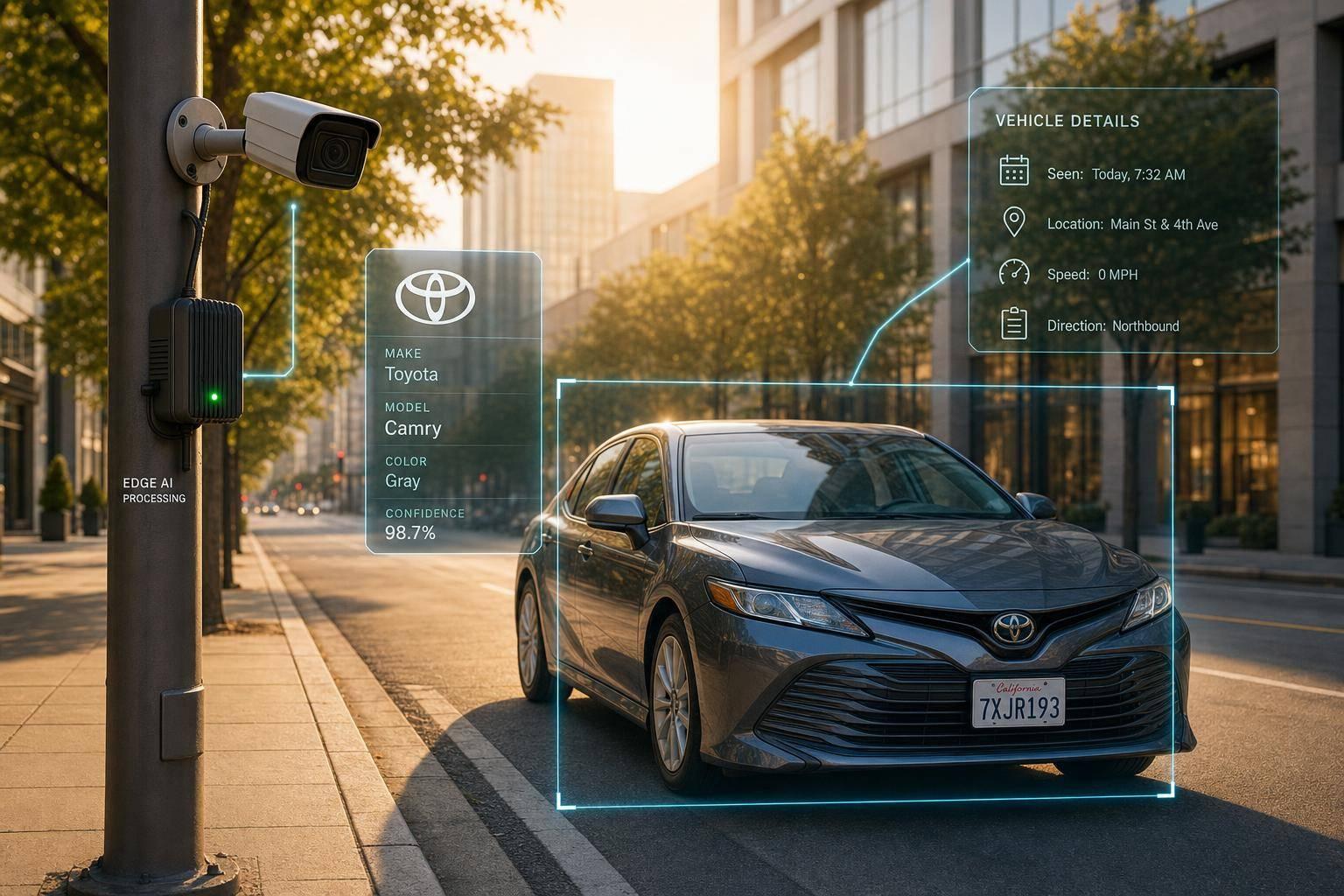
If you need fast vehicle ID at a gate, lot, yard, or roadside site, edge AI is often the better fit. It cuts end-to-end delay to about 120–130 ms, keeps raw video on the device, and trims bandwidth use by sending metadata instead of full footage.
Here’s the short version:
- I’d use make recognition first and add model, year, plate, or VIN only if the job calls for it.
- The core pipeline is simple: detect vehicle → crop image → classify make → run OCR only when needed.
- For edge speed, hardware choice matters as much as the model. Smart cameras fit single-lane setups, while Jetson-class devices fit multi-camera sites.
- Model tuning like INT8 quantization can cut memory by 4x and often speed up inference, but I’d still check per-class accuracy, not just one top-line score.
- U.S. training data should match what cameras will see: pickups, SUVs, state plates, night scenes, rain, winter, and mixed angles.
- In production, I’d watch FPS, end-to-end latency, top-1 accuracy, false positives at night, and low-confidence cases.
- For backend lookups, I’d keep the API key off the device and send only the fields needed for plate, VIN, recall, image, or market value checks.
A few numbers stand out. CPU inference for YOLOv12-s in ONNX can be around 60 ms per image. Roadside systems often need 20–25 FPS per camera and 50–250 ms from frame to result. For weak crops under 120 pixels wide, 3x upscaling can help make-level recognition.
Bottom line: I’d split the job in two. The edge device handles what the camera sees right now. The backend handles changing vehicle data like recalls, specs, and market value in USD. That keeps the setup simpler to run and easier to update.
This article walks through that split: scope, pipeline, hardware, tuning, field testing, privacy, and API enrichment.
Computer Vision Pipeline and Model Options
Detection and Classification Pipeline
Once you’ve picked edge inference, the next piece is the detection pipeline. On the edge, the flow is pretty straightforward: capture, detect, crop, classify.
The camera grabs a frame. An object detector finds the vehicle. That detected area gets cropped. The crop is then preprocessed for recognition, and a classifier predicts the make. OCR reads the plate only when you need a second identity signal.
YOLOv12-s exported to ONNX can run on a CPU in about 60 ms per image. For low-resolution crops narrower than 120 pixels, applying 3x upscaling with cubic interpolation can improve feature recognition accuracy [7].
This two-stage setup - detector first, then classifier - also makes debugging much easier. If something breaks, you can usually tell whether the system failed to find the vehicle or failed to identify it [7].
Fine-Grained Recognition for Visually Similar Vehicles
Look-alike trims are tough to split based on appearance alone. That’s where plate OCR helps.
In practice, using plate OCR as a secondary cue is often a safer way to handle vehicles that look almost identical. EasyOCR is often preferred for edge deployments because it uses a CRNN + CTC architecture and has a lighter installation footprint and simpler API [7][4].
Training Data Requirements and U.S. Domain Fit
For production use in the United States, the training data needs to match what the system will see on actual roads. That means including images of:
- Large pickups and SUVs
- State plate formats
- Nighttime highway scenes
- Overcast and winter scenes common in U.S. deployments [7]
One small but important training detail: disable horizontal flipping in the augmentation pipeline when training on plates and logos. Mirrored versions don’t appear in the real world, so that augmentation can teach the model the wrong visual patterns [7].
Once the dataset matches U.S. driving conditions, hardware sizing and model tuning become the next limit.
CES 2026: Ceva AI Edge Inference Demos | Vehicle Detection, License Plate Recognition & More
Edge Hardware, Performance Limits, and Model Optimization
Edge AI Hardware Comparison for Vehicle Make Recognition
Choosing Embedded Hardware for Real-Time Inference
Once your dataset matches U.S. road conditions, the bottleneck usually moves somewhere else: hardware, optimization, and heat. The device you pick puts a hard cap on throughput, power use, and how much thermal margin you have to work with.
In U.S. vehicle make recognition projects, three hardware groups show up again and again. Smart cameras combine imaging, compute, and networking in one box. Embedded GPU modules are the go-to option when you need to handle multiple camera streams or heavier pipelines. For example, the Jetson Orin Nano 8GB delivers up to 40 TOPS at 7–15W [10][11][15], while the Jetson AGX Orin scales to 275 TOPS at 15–60W and supports 6 direct cameras or 16 through virtual channels [14][15]. Low-power accelerators keep power use and cost down, which makes them a good match for distributed deployments with lots of low-cost nodes.
Jetson Orin NX modules are rated for an operating range of -25°C to 105°C (-13°F to 221°F) [12][13]. That sounds generous on paper, but field conditions are less forgiving. In a hot enclosure, parked under direct sun, those limits can get tested fast. So cooling and enclosure design matter just as much as the module spec itself in U.S. deployments. The best fit comes down to a few plain factors: camera count, enclosure temperature, and whether the site covers a single lane or several camera views at once.
Hardware Class Per-Frame Latency Power Use Cameras per Device Typical Fit Smart camera 50–120 ms 5–15W 1 Gate access, small parking lots Embedded GPU module 10–40 ms 10–60W+ 4–8 Multi-lane facilities, logistics yards, roadside deployments Low-power accelerator 20–60 ms <10W 1–2 Wide-area monitoring, distributed low-cost nodes
After you choose the hardware, the next question is simple: can the model hit real-time speed on that device? That’s where quantization and pruning start to matter.
Quantization, Pruning, and Inference Engines
INT8 quantization reduces weights and activations by 4x and can shorten inference time, with about a 0.5 to 2.0 percentage-point drop in accuracy after calibration and fine-tuning [16][18].
On NVIDIA Jetson hardware, TensorRT is usually the best match. It can cut inference time by about 30% to 50% compared with running the same model in a standard framework [17][18]. ONNX Runtime is useful when you want the same model to move across CPUs, GPUs, and NPUs by changing execution providers. If you're working with lower-power modules, a lighter backbone like MobileNet or EfficientNet-Lite can help you reach 25.0 to 30.0 FPS per stream [17][18].
Pruning removes low-importance weights and channels, which lowers FLOPs and memory access overhead. Sparse INT8 pipelines can improve runtime by around 1.7x with little loss in accuracy [19]. But there’s a catch: if your model needs to tell apart makes that look close to each other, average accuracy won’t tell the whole story. You need to check per-class accuracy after optimization, not just the headline number.
Production Metrics That Matter
Judge the deployment by field results, not by model size.
Roadside systems usually need 20 to 25 FPS per camera and 50 to 250 ms from capture to output. Top-1 accuracy is the share of frames where the predicted make matches the label. A good target is above 90% to 95% on data that reflects actual U.S. fleet mix, including pickups, SUVs, and region-specific models. But aggregate accuracy can hide weak spots. If the model misses a high-volume make too often, that turns into an operations problem fast, even when the overall score looks fine.
A small set of metrics tends to matter most:
- FPS and end-to-end latency
- Top-1 accuracy on U.S. fleet data
- Per-class accuracy for high-volume makes
- False positives in night and rain scenes
Keep each event payload small: timestamp, camera ID, bounding box, make, confidence, and optional plate or VIN [5][9].
sbb-itb-9525efd
Building a Reliable Edge Deployment
Handling Occlusion, Weather, Night Scenes, and Camera Placement
Once the model hits its speed target, the next problem is reliability in the field. That’s where things get messy. Occlusion, glare, rain, and weak lighting can all hurt recognition quality, so your testing needs to match the place where the system will actually run. The aim isn’t perfect-looking images. It’s steady recognition in live scenes.
The model also needs to deal with different camera viewpoints, including front, side, rear, and three-quarter views[6]. If your image stream includes mixed-quality frames, filter out non-vehicle frames before classification[6]. That simple step can save the rest of the pipeline from wasting time on bad inputs.
Benchmarking and Validating the Full Pipeline
A solid validation plan starts with a labeled test set and tracks detection recall along with end-to-end latency[5][7]. Test the detector, cropper, and classifier as one pipeline, not as isolated parts. If one piece fails, the whole system feels it.
Track confidence on a 0–1 scale, and check bounding box coordinates to make sure the detector is locking onto the right region before the next stage runs[5][2]. Your benchmark set should include:
- Cars
- Motorcycles
- RVs
- Trucks
If confidence drops below your review threshold, route those low-confidence results to manual review[2][8]. Then use that output to decide when a prediction should be blocked, reviewed, or accepted.
Model Updates, Logging, and Privacy Controls
Edge models should be updated when site conditions shift or the local vehicle mix changes. Keep prediction logs on the device so you can track history and performance without sending full images upstream[7]. For privacy, send only extracted text and metadata, not raw images or owner data[1][2][7].
When the system makes mistakes, feed those misclassifications into the next retraining cycle so the model can adjust to drift in the local vehicle mix. And if the device loses connectivity, or an API key isn’t available, fall back to unknown status or manual entry instead of dropping the event[7][8]. Only pass along the fields needed for downstream enrichment.
Enriching Edge Recognition with Vehicle Data APIs
Once the edge model spots a vehicle, the backend can turn that raw label into data your team can use. On-device recognition might give you a make like Toyota or a plate string like 7ABC123. From there, the edge device pulls a short identifier - plate text, VIN, or make/model - and sends it to the backend for enrichment.
Using CarsXE to Enrich Edge AI Results
CarsXE fits neatly into this setup. Its API suite covers plate decoding, VIN decoding, recalls, images, and market value[3]. Each endpoint takes the identifier your edge system produces and returns structured fields your workflow can use right away.
The table below shows how key CarsXE endpoints line up with common edge outputs.
CarsXE Endpoint Expected Input Key Returned Fields Integration Point Year Make Model Predicted year, make, model, or trim Canonical year, make, model; body style; engine type; fuel type; MSRP; features; colors After edge YMM prediction to normalize and enrich labels License Plate Decoder Plate text plus U.S. state VIN; registered year, make, model; trim; fuel type; transmission Right after plate OCR to confirm identity and recover VIN VIN Decoder Full 17-character VIN Year; make; model; trim; engine; transmission; drive type; technical specs After VIN is recovered from plate decode or VIN OCR Vehicle Images VIN or canonical YMM Stock image URLs or image IDs For customer-facing portals, inspection reports, or listings Vehicle Recalls VIN Open recall flags; recall descriptions; status Service triage, compliance checks, fleet safety routing Market Value VIN or YMM plus mileage, condition, and ZIP code Estimated market value in USD; retail and trade-in values Insurance claims, dealer intake, trade-in estimators VIN OCR Image of the VIN plate or label, or a base64 string Extracted VIN text; OCR confidence score When edge hardware can't reliably parse the VIN locally
Keep your CarsXE API key on the backend, never on the edge device. It’s a simple rule, but it matters.
You should also use confidence-gated logic. For example, only call the License Plate Decoder when plate OCR confidence is above 0.90[2][5]. That cuts wasted API calls on weak or blurry frames. And if the same vehicles show up again and again - fleet units, employee cars, or common local traffic - cache the results so the same VIN doesn’t trigger the same lookup over and over.
Use Cases for Developers and Automotive Businesses
These fields fit common U.S. workflows without much translation.
A repair shop, for instance, can place a camera at the service lane entrance. The edge device identifies the arriving vehicle and sends the plate string to the backend. The backend then resolves the VIN and pulls specs plus open recalls, which can auto-fill the work order before the customer even reaches the advisor. That cuts manual VIN entry - one of the main reasons shops end up ordering the wrong parts - and puts recall flags in front of staff early.
Fleet operators can use the same pattern for yard inventory. The edge device logs entries and exits by plate or make, while the backend resolves each identifier to a VIN and calls CarsXE's Market Value endpoint to track asset value in USD and flag units nearing the best resale window. Insurance adjusters using mobile apps can also benefit here. They can capture a vehicle photo, identify the make on-device, resolve the VIN through plate decode, and auto-fill the claim with verified specs and a market value estimate. That VIN cross-check helps catch cases where the photographed vehicle doesn’t match the unit listed on the policy, and it does that early, before the claim moves too far down the line.
Conclusion: Key Decisions for a Successful Rollout
Set the recognition scope early. Train on U.S.-specific vehicle, plate, and lighting conditions. Benchmark the full pipeline in real scenes, keep raw imagery on-device, and handle edge recognition and API enrichment as separate update cycles.
A good way to think about it: the device handles what it sees, and the API handles what changes. Visual recognition logic stays on the device. Pricing, recall data, and other fast-changing vehicle details stay in the API. That split keeps updates simple.
FAQs
When is edge AI better than cloud processing?
Edge AI works better than cloud processing when your application needs immediate, real-time results.
Cloud-based tools such as the CarsXE API suite are a good fit for scalable data retrieval and batch processing. Edge AI, on the other hand, is ideal for local tasks with strict time limits, where fast preprocessing and on-device decision-making matter most.
How much image quality does make recognition need?
Image quality matters a lot for vehicle make recognition. The AI needs clear visual details to tell the year, make, model, and body style apart. When the image is sharper and cleaner, the system usually performs better.
That said, not every photo comes in perfect shape. AI can help deal with common problems like poor lighting, motion blur, and low resolution by using preprocessing methods such as denoising and super-resolution.
CarsXE also offers an Image to Vehicle API that can identify these vehicle details from a single image.
What hardware fits a multi-camera vehicle site?
A multi-camera vehicle site needs hardware that can handle heavy compute loads and support scalable, high-performance processing for real-time recognition.
A strong setup often includes running the environment in Docker containers so behavior stays consistent across cameras and hardware units. That makes it easier to manage large volumes of visual data without things getting messy.
Related Blog Posts
- AI Noise Reduction in License Plate OCR
- Challenges in Identifying Similar Vehicle Models
- Real-time Multi-language Plate Recognition: How It Works
- Top Plate Recognition APIs for Traffic Systems