
No VIN required
Year Make Model API
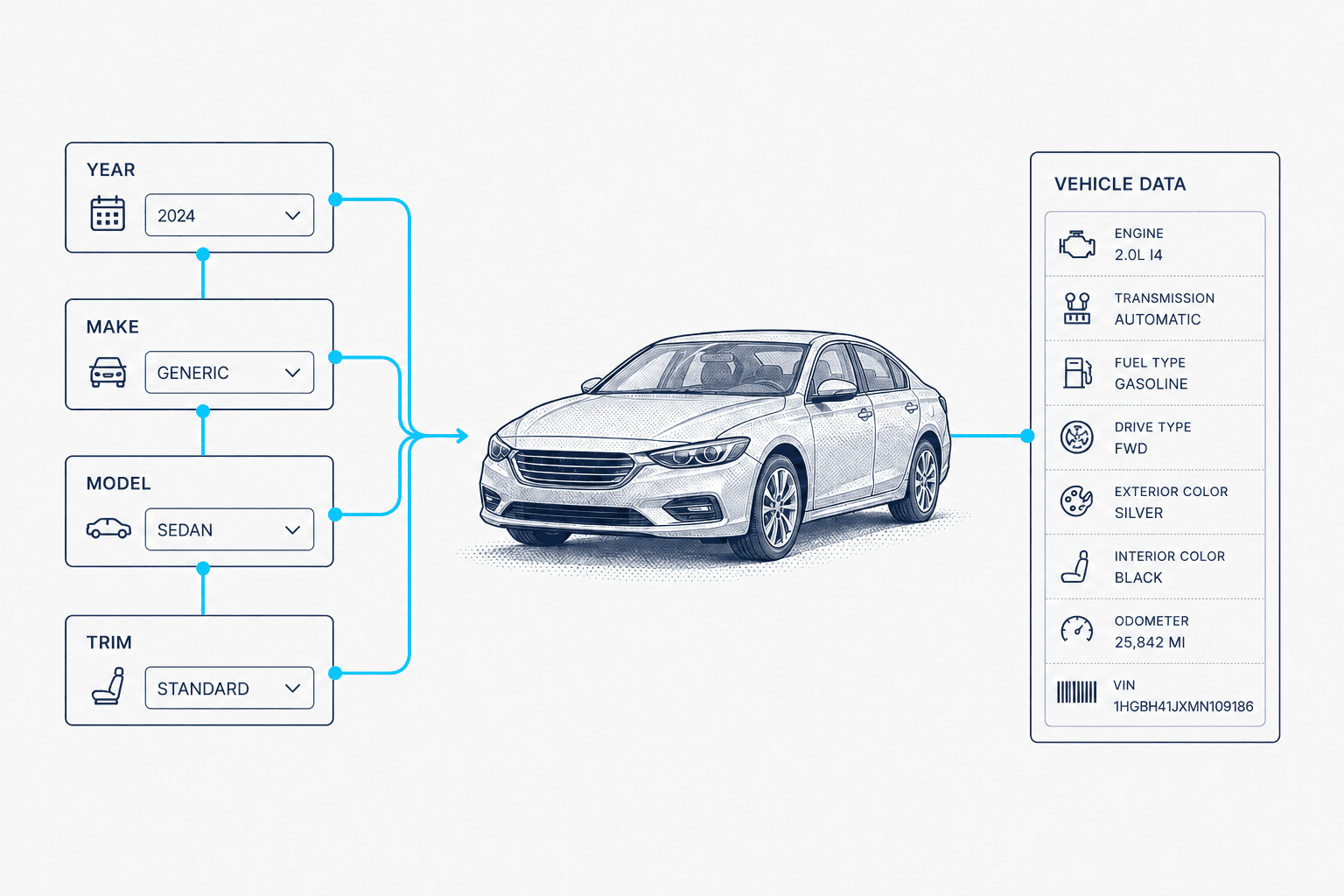
Full specs from three values, not a VIN.
- Matched trim, body style and engine
- Base MSRP and original dealer invoice
- Exterior and interior colors, with RGB
- Standard features grouped by category
Our benefits
For every vehicle that arrives without a VIN.
Both sides of the sticker
base_msrp and base_invoice come back together, so a quoting tool can work from what the vehicle listed at and what the dealer paid.
Integrate in minutes
Three parameters and a JSON response. Copy the request from the panel below, add your key, and the first lookup runs in minutes.
People who know the catalog
A free sandbox, a documented response, and support that can tell you how deep a given model year runs before you build a configurator on it.
Fill the dropdowns too
A second endpoint returns the option lists behind year, make, model and variant selects, so the same key powers the picker and the lookup.
For developers
Three values in, a full trim out.
The panel on the right is a real request for a 2023 Toyota Camry XLE and the response it returns. Scroll it to see the colors and the grouped features, then copy the request and swap in a year, make and model of your own.
- Fuzzy trim matching
- trim is a hint, matched loosely, so a partial or misspelled value still resolves to a real trim.
- Or ask for every trim
- Pass allTrimOptions=1 and trimOptions returns the full list, so a user can pick before you match.
- The dropdown endpoint
- /v1/ymm-options returns exactly one list per call: years, makes, models, trims or variants.
curl -G https://api.carsxe.com/v1/ymm \
  -d key=YOUR_API_KEY \
  -d year=2023 \
  -d make=Toyota \
  -d model=Camry \
-d trim=XLE{
"success": true,
"bestMatch": {
"make": "Toyota",
"model": "Camry",
"year": "2023",
"name": "XLE 4dr Sedan (3.5L 6cyl 8A)",
"base_msrp": 35000,
"base_invoice": 32500,
"total_seating": 5,
"color": {
"exterior": [ { "name": "Supersonic Red", "rgb": "226,5,0" } ],
"interior": [ { "name": "Black, leather", "rgb": "0,0,0" } ]
},
"features": {
"standard": [
{ "category": "Power Feature", "features": [ "..." ] },
{ "category": "Warranty", "features": [ "..." ] }
]
}
}
}For AI agents
Built into the AI tools you already use
Point your coding agent at the CarsXE MCP server and it can call the API on its own, no client library, no glue code. The same tools are available to chat agents over plain HTTP.
- Claude Code
- Cursor
- GitHub Copilot
- Grok Bot
- Codex
- Gemini
- Hermes Agent
- OpenClaw
- opencode
- & more
One command. Register the CarsXE MCP server with your editor.
claude mcp add --transport http carsxe https://mcp.carsxe.com/mcp \
--header "X-API-Key: YOUR_API_KEY"Then just ask. The agent picks the right CarsXE tool and returns structured vehicle data.
Get specs for a 2023 Toyota Camry XLEAgent onboarding. Are you an AI agent? Fetch this skill to get an API key and start pulling vehicle data.
curl -s https://carsxe.com/agent-onboarding/SKILL.mdFair billing
No data, no charge
A lookup we cannot resolve comes back as a 404 and costs you nothing. You are billed only when the API returns data.
{ "success": true, "bestMatch": { "make": "Toyota", "model": "Camry", "year": "2023", "name": "XLE 4dr Sedan (3.5L 6cyl 8A)", "total_seating": 5 } }Billed. One lookup.
{
  "success": false,
  "message": "No data found"
}
No charge.
Priced per answer, not per request.
Deepest in North America
Robust international support
Trim, pricing and feature data are deepest for the United States market, and coverage thins for vehicles never sold there.

United States
US
Customer stories
Companies love building with CarsXE
How teams build on CarsXE vehicle data.

“
CarsXE offers MotorTango's customers accurate and reliable vehicle data across many makes and models. Their VIN decoder and specs API are second to none.
Andy Liakos
CTO, MotorTango

“
The API is super easy to work with...it's a damn good API. And trust me, I deal with a lot of third parties and you're the creme de la creme. It's great. Documentation is sound, the result sets are sound. I have nothing to say but, man, it's too easy to work with.
Alan Deitch
Senior Engineering Leader, SpotHero

“
When a customer calls a dealership, we know they have an open recall instantly. That changes what the call is worth. Our agents book the recall alongside whatever the customer originally called about, and the dealer captures service work that used to walk out the door unnoticed. CarsXE's recall data is what makes that possible on every call, at every rooftop we run.
Samee Khan
Founder & CEO, PAM

“
With their VIN decoder and images, we can accurately document what's needed to perform repairs and ADAS calibrations, and we do it much more efficiently — saving dozens of minutes on every single repair. The result is consistent, reliable service at scale for all of our customers, backed by data we trust. CarsXE has become a critical part of our workflow and our ability to grow.
Philip Brossy
Founder & CEO, ADAS Safe
Same key, more endpoints
Keep building from the vehicle record
Workflows
Not sure which APIs you need?
Paste your company's website and we'll suggest a step-by-step workflow built from real CarsXE APIs, with a link to the docs for each one.
FAQ
Frequently asked questions
Can't find the answer you're looking for? Reach out to our customer support team.
Get started
Ready for the test drive? Start building today.
Test drive CarsXE's platform. Sign up with your work email.