How VIN Decoding Helps Spot Odometer Rollbacks

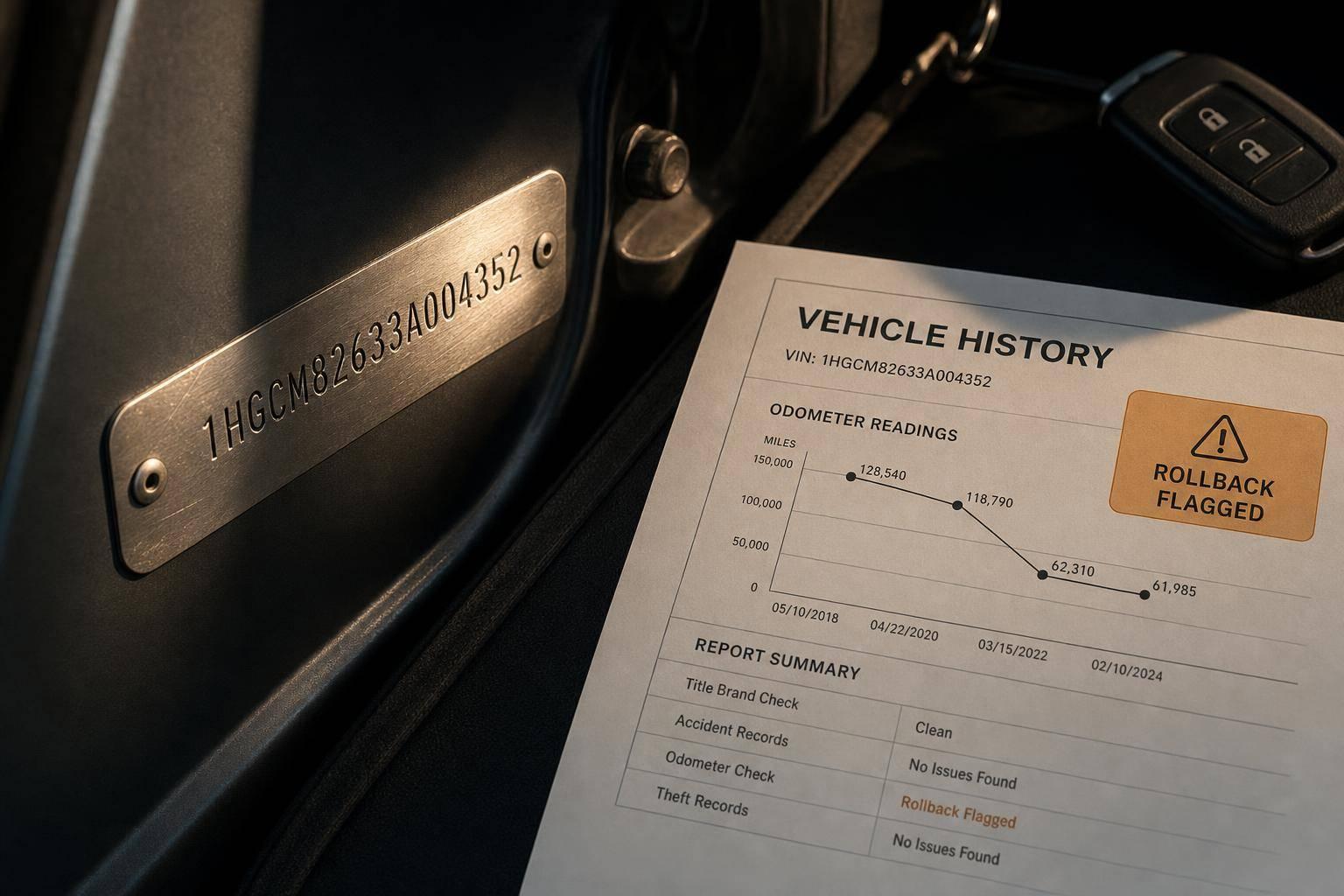
How VIN Decoding Helps Spot Odometer Rollbacks
A rollback usually shows up when a newer record lists fewer miles than an older one. That one check can help you avoid overpaying by $1,000s for a used car with more wear than the odometer shows.
When I check a used car’s mileage, I keep it simple:
- Confirm the 17-character VIN on the car and on the paperwork
- Decode the VIN to make sure the records match the same vehicle
- Line up dated mileage records from title, inspection, service, auction, and claim data
- Watch for mileage going backward, long gaps, or miles that barely change over time
- Review title brand codes like 69, 70, 73, 74, 76
- Compare the odometer to vehicle wear and old service invoices
A clean odometer display does not prove the mileage is right. In the U.S., every vehicle built since 1981 uses a standard 17-character VIN, and that VIN ties the car to past records. If one record shows 120,450 miles on 03/14/2024 and a later one shows 98,200 miles on 08/22/2025, that’s a red flag.
Here’s the short version: I use the VIN to confirm the car’s identity first, then I sort all mileage records by date, and then I check for conflicts. If the history moves backward - or the title shows an odometer warning - I stop and look closer.
Check What I look for Red flag VIN match Same VIN on dash, door jamb, title, records One character off VIN decode Year, make, model, engine, body style match the car Specs do not match Mileage timeline Miles go up over time Later record shows fewer miles Title brands Odometer-related codes 69, 70, 73, 74, 76 Vehicle condition Wear matches displayed miles Heavy wear with low miles
If you want a fast way to screen rollback risk, this is it: verify the VIN, sort the mileage trail, and flag any backward move.
How to Spot Odometer Rollbacks Using VIN Decoding
9 Simple Tricks to Expose a Rollback Odometer in Seconds ( DEALERSHIP SCAMS)
sbb-itb-9525efd
Step 1: Gather the VIN and the right mileage data sources
Before you can spot a rollback, you need two things: a confirmed VIN and date-stamped mileage records tied to that VIN. Without both, you're guessing.
Confirm the VIN on the car and across all paperwork
The VIN shows up in a few places on every vehicle. The easiest one to check is the dashboard plate, visible through the windshield on the driver’s side. You should also find it on the driver-side door jamb sticker, which lists the manufacturing date too. Then compare that VIN with the one on the title and any service records.
Every one of those should match exactly, all 17 characters. If even one character is off, the records may belong to a different vehicle.
VIN Verification Source Key Data to Match Dashboard / Windshield 17-character VIN Driver-Side Door Jamb VIN, manufacturing date Title VIN, title brand Service Records VIN, date-stamped odometer readings
Use a VIN decoder to verify the check digit, which validates the full 17-character VIN[3]. If the check digit fails, the VIN may have been changed.
Once the VIN on the car matches the VIN on the paperwork, start pulling every dated mileage record linked to it.
Pull mileage history from title, inspection, and service records
Use the confirmed VIN to build a mileage timeline, starting with the oldest record and moving forward.
Pull every dated mileage record tied to that VIN, including:
- title records
- state inspections
- emissions tests
- service invoices
- auction events
- insurance claims
Each record should show both a mileage figure and a date. In the U.S., mileage is recorded in miles (VehicleOdometerReadingUnitCode = M)[1]. Keep the dates in MM/DD/YYYY format[1].
Use title issue dates, brand dates, and insurer or salvage acquisition dates to place each reading in time[1]. Also check for Reading at Time of Renewal entries (Code 75). These often appear between major ownership events and can help close gaps in the timeline[1].
Use CarsXE APIs to centralize VIN and history data
If you're working with a larger volume of vehicles, pulling all of this by hand gets old fast. It also makes mistakes more likely.
That’s where CarsXE comes in for dealer operations, insurers, repair groups, and software teams. Its Vehicle Specifications API and Vehicle History API help keep the record trail in one place.
The Specifications API decodes the VIN and returns the year, make, model, trim, and engine type. That gives you a clean baseline to check whether the physical car matches the records you’re about to review[2].
The History API returns a historyInformation array with fields such as TitleIssueDate, TitleIssuingAuthorityName, and VehicleOdometerReadingMeasure. Sort those records by date, and you can spot mileage that moves backward[1]. It can also show junkAndSalvageInformation and brandsInformation, which helps with fraud screening[1].
If your team needs to pull VINs from physical vehicles without typing them in by hand, the VIN OCR API can read the VIN string from photos of dashboard plates or door jamb stickers[4]. And if you’re starting with a license plate instead of a VIN, the Plate Decoder API can resolve the plate to a VIN before the history lookup starts[4]. Both are part of CarsXE’s RESTful API suite.
Step 2: Decode the VIN and build a mileage timeline
Once you've confirmed the VIN, the next job is simple: make sure the history actually belongs to this vehicle, then line up the mileage records by date. Start by checking the decoded specs. After that, build the mileage timeline.
Match decoded vehicle specs to the vehicle
Run the VIN through a decoder and compare the results with the vehicle in front of you. Pay close attention to the details that matter most for mileage checks: make, model, year, body style, engine, and fuel type.
Attribute Category What to Compare Core Identity Make, model, year Physical Build Body style Mechanical Engine, fuel type
It also helps to check the plant code and manufacturer name against the door-jamb label. If the VIN decodes to a different setup than the actual vehicle, that can point to a VIN swap. In that case, the mileage history you’re reviewing may belong to a different vehicle [3].
Sort mileage entries by date and check for backward movement
When the specs line up, pull every VehicleOdometerReadingMeasure entry from the history records and sort them from earliest to latest. The pattern should be simple: the number goes up over time. If a later record shows a lower reading, that’s a direct rollback signal [1].
Check whether yearly mileage is realistic for the vehicle
Next, compare the total mileage with the vehicle’s age. Very low yearly mileage isn’t proof of fraud on its own. Some cars just don’t get driven much.
But if the low reading shows up alongside gaps in the timeline or wear that doesn’t match the odometer, that’s where things start to look off.
Treat any mismatch or odd mileage pattern as the cue for the next cross-check.
Step 3: Cross-check red flags with supporting evidence
When the timeline doesn’t line up, check it against wear, service, and title records. One mileage drop can point to fraud. Or it can be a simple recording mistake. The goal here is to separate one from the other.
Compare the odometer reading with wear and service records
Start with the car itself. Does the condition match the mileage showing on the odometer?
Look at wear on the steering wheel, pedals, seats, and shifter. Then compare that with oil-change stickers, repair invoices, and any other service records you can get. Those records often tell a much clearer story than the dashboard alone.
If an older service record shows more miles than the current odometer reading, treat that as a rollback flag.
Review title brands, disclosure notes, and legal status
If the wear check still leaves you unsure, title brands can help sort out likely fraud from mechanical limits or an odometer swap. U.S. title records use brand codes that explain the type of mileage issue on file [1]:
Brand Code Name What It Means 69 Not Actual Mileage Odometer reading is known to differ from the true mileage 70 Odometer Tampering Verified Tampering has been confirmed 72 Exceeds Mechanical Limits Odometer cannot display the full true mileage 73 Odometer May Be Altered The title record suggests the reading was altered 74 Odometer Replaced The odometer has been replaced 76 Odometer Discrepancy Known previous recorded values conflict with the current reading
Codes 69 and 70 are high-risk signs. Code 72 can point to a rollover instead of fraud. Code 74 means you should check service records for the replacement date. Codes 73 and 76 need a manual review.
"The titling authority has reason to believe that the odometer reading does not reflect the true mileage of the vehicle because of known previous recorded values of odometer for the vehicle." - CarsXE [1]
Add automated fraud checks in CarsXE-powered workflows
If you review a lot of vehicles, do these checks automatically. In CarsXE-powered workflows, sort historyInformation by TitleIssueDate and flag any later record with a lower mileage for manual review.
Also, store the uuid and timestamp from each API response in your audit log. That gives you a record of the vehicle’s status at the time of inspection [1].
Conclusion: A straightforward VIN-based process for spotting odometer rollbacks
Once you confirm the VIN, build the mileage timeline, and cross-check the records, the pattern usually gets pretty clear. VIN decoding works best when it's tied to a verified VIN and dated mileage records. Sort the records by date, then flag any reading that moves backward. Codes 70, 73, and 76 are strong red flags, but a clean title still does not prove the mileage is accurate [1].
For teams reviewing vehicles at scale, you can automate those same checks. Using CarsXE's Vehicle History API, sort historyInformation by TitleIssueDate and flag the brand codes tied to mileage issues [1]. That combo makes rollback checks faster and harder to miss.
FAQs
Can a mileage drop ever be a clerical error?
Yes. A mileage drop can happen because of a simple clerical mistake, like someone entering the wrong number at a DMV or titling office.
That said, a big drop is often a red flag for tampering. So it helps to check multiple history records and see the full pattern. If the mismatch shows up only once, it may be an isolated error. If it appears across records, it could point to odometer fraud.
What if the VIN matches but the mileage history has big gaps?
Large gaps in mileage history can be a red flag for odometer fraud. That’s especially true when the current reading is lower than a mileage figure recorded earlier.
Check the status codes too. They can tell you if something doesn’t add up.
- 70 means confirmed odometer tampering
- 76 means an official odometer discrepancy identified by a titling authority
A CarsXE vehicle history report can help spot these issues before you finalize a purchase.
How do I tell the difference between low mileage and a rollback?
Compare the current odometer reading with the vehicle’s official history. If the number has been rolled back, it means someone changed the odometer to show fewer miles than the vehicle has actually driven.
A VIN check is the best way to catch this. With data from the CarsXE Vehicle History API, watch for mileage that drops over time or jumps in odd ways. Those patterns can point to tampering.
Related Blog Posts
- How VIN Decoding Reveals Flood Damage
- How VIN Decoding Powers Compliance Verification
- How VIN Decoding Retrieves Vehicle Specs
- Customs Compliance with VIN Decoding